Showing posts with label windows mobile. Show all posts

Friday, November 29, 2013

Android leads Internet mobile users traffic.Chart. Q3-2013.

WorldWide Tech & Science. Francisco De Jesùs.


According to webindex , in two short years Android has blown up the mobile market, going from 142m users (57% market share) to 709m users. This incredible growth is surely one of the most rapid marches to market dominance in history. iOS has also grown substantially from 75m users in Q2 2011 to 232m users in Q3 2013 (19% market share). The big loser is Symbian, which has fallen from a 20% market share to 5% in just two years. This is followed by Blackberry (down to 5% share) and Windows Mobile (6% market share), although Windows Mobile has recently started to grow again in 2013.


Interestingly, “Don’t know” has fallen from 20% market share to 5% market share, indicating how important the OS experience has become to users.


These results underline how mobile operating systems have radically reshaped the internet experience. Today, thanks to OS integration of internet services (e.g sharing via Twitter), in-built aggregation tools and the central positioning of app stores means the operating system is increasingly defining how we use the internet. This has far-reaching impacts across all aspects of digital behavior and can be crystalized in the example of the growth of messaging apps such as WhatsApp, Snapchat and Line. No longer do we need one service to do it all;operating systems promote the usage of an increasing number of services that do one thing, and do it well.


Enhanced by Zemanta

Monday, November 22, 2010

HP iPRINT PHOTO 1.0 mobile apps for Android, Windows mobile and Symbiam

WorldWideTech. Francisco De Jesús.


HP iPRINT PHOTO 1.0
for Android FREE

HP iPrint Photo 1.0 is a free downloadable mobile app that allows you to capture, edit, and wirelessly print photos directly from your Android phone to HP Inkjet printers connected to a local wireless (WiFi) network.


What You Can Do :
  • With the HP iPrint Photo 1.0 mobile app for Android, you can capture and crop photos and then print them on plain or photo paper in a variety of sizes, including 3.5" x 5", 4" x 6", and 5" x 7" (9 x 13 cm, 10 x 15 cm, and 13 x 18 cm)*.
  • HP iPrint Photo 1.0 prints to more than 200 HP Inkjet printer models and with HP's image scaling technology, you'll get the great print quality you count on from HP.
  • Plus, HP iPrint Photo 1.0 automatically discovers and sets up your wireless HP Inkjet printer without the need to install drivers or deal with complex network configurations.

Download Now

It's easy to download and install HP iPrint Photo 1.0 from Android Market to your device; just follow these steps:
  1. Launch Android Market on your Android phone.
  2. Select the Apps tab
  3. Search for HP iPrint Photo
  4. Select HP iPrint Photo
  5. Then select the Install button. HP iPrint Photo will start downloading immediately.

HP iPRINT PHOTO 1.0
for Windows Mobile and Symbian  FREE
HP iPrint Photo 1.0 is a free downloadable mobile app that allows you to wirelessly print 4" x 6" photos directly from your Symbian or Windows Mobile based smartphone to HP Inkjet printers connected to a local wireless (WiFi) network.

What You Can Do
  • HP iPrint Photo 1.0 prints to more than 200 HP Inkjet printer models and with HP's image scaling and de-noise technology, you'll get the great print quality you count on from HP.
  • Plus, HP iPrint Photo 1.0 automatically discovers and sets up your wireless HP Inkjet printer without the need to install drivers or deal with complex network configurations.
Download Now
  • HP iPrint Photo 1.0 is available from Ovi by Nokia. It only takes a few moments to download HP iPrint Photo to your Nokia smartphone.
  • HP iPrint Photo 1.0 is available from Windows Marketplace for mobile, which is easily accessible from your Windows Mobile 6.0, 6.1 and 6.5 phones. It only takes a few moments to install HP iPrint Photo on your Windows Mobile 6.0, 6.1 and 6.5 phones. Just login to Microsoft Marketplace on your phone using your Windows Live ID and password, choose HP iPrint Photo from the list of applications and select to install.


Sunday, September 19, 2010

HP iPrint Photo App for Sybiam (Nokia) and Windows Mobile. Learn

Download instructions


HP iPrint Photo is available from Ovi by Nokia. It only takes a few moments to download HP iPrint Photo to your Nokia smartphone.1 

HP iPrint Photo is available from Windows Marketplace for mobile, which is easily accessible from your Windows Mobile 6.0, 6.1 and 6.5 phones. It only takes a few moments to install HP iPrint Photo on your Windows Mobile 6.0, 6.1 and 6.5 phones. Just login to Microsoft Marketplace on your phone using your Windows Live ID and password, choose HP iPrint Photo from the list of applications and select to install. 


How to use HP iPrint Photo


Once you have loaded HP iPrint Photo to your smartphone-you are ready to go. In a few clicks you can print photos from anywhere within range of your wireless network. 


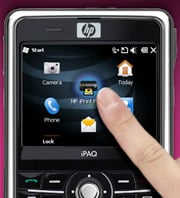
1) Click on the HP iPrint Photo icon

1. Click on the HP iPrint icon
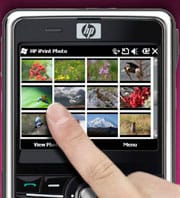
2) Select the photo 


2. Select the photo
3) Click print


3. Select a printer

You should now be printing a 4"x6" or 10x15cm photo from your HP printer2. 

Note: If this is the first time printing to a specific printer, select the desired printer from the list of available printers. You will not be required to complete this step again in order to print additional photos on the same printer. 


How to select multiple photos and print


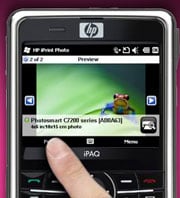
Launch HP iPrint Photo. Highlight the photo and select it. In preview mode, press menu and then press Select Photo. A circle with a check box will appear in the upper right hand corner of the photo with 1 of 1 showing. 

To select another photo, navigate through the photos using the arrow buttons in the preview pane – or go back to the thumbnail view and repeat. Each time you select a photo to print, the counter will increase to 2 of 2, 3 of 3, etc. If you go back to the thumbnail view, each photo you have selected to print will have a check mark next to it. Once you have selected all the photos you want to print, click print in the preview mode. 


How to select a printer


From the preview screen press the "menu" button, then select Printer Settings. The printers available to you will display in a list. 

You can also press the printer icon in the bottom right hand corner, which will bring up the printer list. 


Supported network environments:


HP iPrint Photo leverages mDNS technology to automatically identify HP wireless printers available on your network. HP iPrint Photo supports industry standard WiFi environments. 


HP iPrint Photo Support:


Get support for HP iPrint Photo. 

Find supported printers for HP iPrint Photo Software.

LG OLED evo M5, the Only True Wireless OLED TV With G5’s Excellence in Picture Quality.

  With Uncompromised, Low-Lag Performance at 4K 144Hz, LG’s Advanced Wireless Technology Sets a New Standard for Clutter-Free Gaming and Hom...

Popular Posts